Tips on How to Start an Email: Become Proficient in Emailing:

Highlights

In today's changing era, email continues to be a crucial tool for professional communication. Whether you're contacting a client, coworker, or supervisor, how you start and end your email can significantly impact how your message is received. Effective email communication is a crucial ability in both business and academic settings. It's critical to get your emails off to a good start with a suitable salutation and a compelling opening statement. In this blog, we'll look at how to start an email and provide guidance on crafting email greetings and signoffs that strike a balance between professionalism and personalization.
How to Start Email?
Let’s start your mail, well, not by the first sentence itself, but by being presented nicely.
1. Selecting a Suitable Greeting
The first thing that should be done as part of email writing is email salutations. Greeting the person depends on whether the recipient is your friend and the communication environment. These are the sample emails I urge you to consider:
a. Formal Email Greetings:
[Recipient Name]: This becomes the most acceptable choice for business email correspondence. "Name usage" is the better option unless it's you share a friendship, or other circumstances call for "informality".
Dear [Recipient Name], A professional option without resorting to a formal tone. This may be a preference for colleagues and those in the same profession who you communicate with via email.
Good [morning/afternoon/evening] [Recipient Name]. Considering that time plays an important role in conveying your feelings, make sure you are not too casual while still staying professional in your address.
Beware of mistaking the moment, always capitalize the c, and the word "good" when addressing someone. For instance, "Hi, nice to meet you," say like "Mr. Smith".
b. Casual Email Greetings:
Hi [Recipients Name]; For colleagues or acquaintances you are familiar and comfortable with, an informal greeting (Hi/Hello).
Hey [Recipient Name]! This is for the chill seekers among us. It can be deployed in circumstances involving a high level of expectation of familiarity, e.g., when people converse with close friends or informal team communications.
Hi [Recipient Name]!; I tend to opt for a medium level of formality for the basic one. It's appropriate for formal occasions, and you can also get a medium level of informality.
2. Addressing the Recipient
It is possible to use either his or her name to make the greeting. Through the use of proper name you make your email more personalized and also show that you have put some time to respond based on the recipient in mind. Verify the spelling correctly, lest you stumble upon the awkward situation of laughingstock or either.
3. Adapting Your Greeting to the Relationship
Keep in mind when you choose an opening phrase of a gift your acquaintance with the recipient. Formality is usually the tendency whenever writing to the head of the company or the human resources department. On the contrary, if you are conversating with a coworker or friend of many years, within a less formal setting, for instance, you can go for an informal greeting.
4. Be mindful of maintaining a tone in your communication in formal or business-related emails.
Be aware of the tone that you are using to write an email. Don’t be formal as not everyone is comfortable with you.
How to start a professional email?
Assume for the moment that the recipient of the email is someone you do not directly know.
For example, while applying for a job, a candidate for HR manager sends a message to the head of the organization's HR department. In this instance, the job seeker will undoubtedly want some expertise in professional writing.
Worried that, in this case, how to start a professional email?
In recent times, communication in business has become more casual. Therefore, not many people will be perplexed if someone opens an email with "Hello" or "Hi," especially if they are younger or of the same age as the sender. If the individual you are responding to has a tendency to use what is known as business casual style, you should respond in a similar manner.
However, if you wish to write to an elderly individual, we advise against using this greeting. The following greetings are suggested when sending emails in this format: "good morning," "good day," "good afternoon," or "good evening." Since you have no idea who you are writing to, it is best to choose a neutral term to prevent causing unneeded annoyance. It's a wonderful idea to proofread the text for errors before sending a formal email.
Reports and emails have one thing in common: they are professional and clear. Our report writing service can be useful if you're not sure how to keep the appropriate tone.
How To End an Email Professionally?
After you've completed the longest section of your business email, you'll need to choose how to end the message. You can't go wrong as long as you select a professional sign-off that fits the email's context, even though some people have strong preferences about certain ones.
Daniela Camejo Sanchez, senior writer at content production company Writer Army, says, "I always say 'thank you so much for your time,' or 'thanks in advance' if the purpose of my email was to ask questions or if I'm providing instructions on a project to someone." "It's always a good idea to express gratitude and kind regards!"
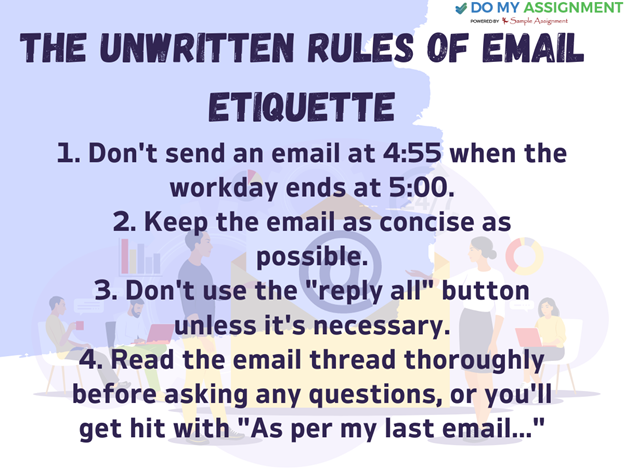
Examples of Formal Email Signoffs
Formal email signoffs quickly and professionally summarize the message without being overly personal.
- Sincerely
- Best
- Kindly
- Regards
- Warm regards
- All the best
- Thank you
- Thank you in advance
Examples of Informal Email Signoffs
Do you want to sign an email with a less formal feel? There are still ways to maintain professionalism while maintaining a casual tone when sending an email to a coworker with whom you have a relatively causal relationship. The following informal email signoffs are still suitable for the workplace:
- Have a great day
- Stay tuned
- Cheers
- Take care
- Talk soon
- Onwards and upwards!
- Looking forward to hearing from you
- Thanks
Inappropriate Email Signoffs
While some professional email signoffs are acceptable, most are excessively informal or unsuitable for a professional setting. Here are a few instances of these:
- Love
- Thx
- Yours
- Yours truly
- XO
- Peace out
- See ya
- (or any other emoji)
Points to Keep in Mind While Ending An Email
To learn how to end an email professionally and in a courteous way, follow these steps:
1. Examine the email's body:
Think about reading the email body again before writing a closing that sums up your entire message. This can assist you in making a connection between your conclusion and the message's main goal, which is to remind the reader of the content they just read and the action you're asking of them. You can also better understand the email's tone by reading it again. For example, if you have typed a message that is formal and businesslike, your final sentence should also convey this.
2. Express your appreciation
Make sure to thank the reader for their time in one or two sentences in your closing paragraph. The reader will feel valued for taking the time to read your email through this courteous approach. A courteous closing statement can make many professionals feel as though they must repay the favor by composing a response or giving your requested task top priority.
3. Include an action request:
Provide a call to action or ask the reader to do a task or favor for you after you have thanked them in your conclusion. In a letter to a hiring manager, your call to action might be to inquire about an interview or provide an update on the status of your application.
4. Use your entire name to sign off:
Your first and last names should appear below your closing remarks. This aids the reader in recalling the sender of the letter and instructs them on whom to address their message when composing their reply. When applying for a job, make an effort to use your entire name on your cover letter, resume, and any other shared documents. Hiring managers will find it easier to remember you if you use your full name consistently across all application materials, which will also improve your chances of receiving a response.
5. Provide your contact details and professional title:
To provide the recipient with a clearer understanding of your professional status, you have the option to include your current job title. While you might want to avoid mentioning your job title in some circumstances, most of the time, it's a good way to show what you do. Include your direct phone number and other contact information in your email so that the reader can easily get in touch with you and ask questions about the specifics of your message.
6. Carefully proofread the email:
Make sure there are no spelling or grammar mistakes in your email by carefully proofreading it after you've finished writing it. If your email is easy for the recipient to scan and review quickly and is presented in a professional manner, they are more likely to take it seriously. You can ask a friend or coworker to read your message and then decide whether or not to implement their suggestions. Before sending the email, you might want to read it aloud to yourself to help you identify any possible problems.
Final Thought
The way you begin an email affects whether or not the recipient will reply or choose to ignore it.
You're not the only one who finds it difficult to compose formal emails. We will assist you in overcoming this common issue by assisting you in moving past the initial stage—starting. We'll go over formal email greetings and opening lines that may help you compose a perfect email.
So, what are you waiting for? Choose "Do My Assignment" experts and learn to be fluent in writing a business email. Furthermore, we not only help students in writing emails, our experts offer assignment help online services that help students to conquer their academic challenges.



Nick Johnson
Nick is a multi-faceted individual with diverse interests. I love teaching young students through coaching or writing who always gathered praise for a sharp calculative mind. I own a positive outlook towards life and also give motivational speeches for young kids and college students.
Get Free Quote In 2 Minutes*

Related Blog



Still Confused? Take a look at the reviews of DoMyAssignment
6984+ Positive Reviews with a rating of 4.9/5

21-04-2023
Biotechnology
Incredible service! My assignment was perfect and delivered on time. Highly recommend Do My Assignment!Connor, Order Code: SA**398

18-04-2023
Management
Excellent support and high-quality work! Saved me so much time and stress. Thank you!Peter, Order Code: SA**358
12-04-2023
Nursing
Fantastic experience! Quick delivery and top-notch quality. Will definitely use Do My Assignment again!James, Order Code: SA**698
05-04-2023
Accounting
Reliable and professional! The assignment met all my requirements. Great service!Jordie, Order Code: SA**613
21-04-2023
Mathematics
Outstanding work! The team was very responsive and the assignment was flawless. Highly recommended!Harper, Order Code: SA**112
28-03-2023
Management
Do My Assignment exceeded my expectations! Detailed, well-structured, and prompt delivery.Tom, Order Code: SA**558
21-03-2023
Engineering
Highly satisfied! My assignment was well-researched and excellently written. Great job!Chris, Order Code: SA**287
15-03-2023
Physics
Amazing service! The quality exceeded my expectations. Delivered before the deadline!Sheryl, Order Code: SA**412
10-03-2023
Programming
Superb assistance! Professional, punctual, and perfect. Do My Assignment is the best!Ben, Order Code: SA**271
18-04-2023
Statistics
Exceptional work! The assignment was detailed and well-organized. Truly impressed!Sydney, Order Code: SA**388
09-03-2023
Company Law
Top-quality service! My assignment was accurate and well-written. Will use again!Tory, Order Code: SA**943
04-03-2023
Xero
Professional and efficient! Delivered high-quality work right on time. Very pleased!Henry, Order Code: SA**732
23-02-2023
Economics
Fantastic support and excellent writing! Made my academic life so much easier!Cameron, Order Code: SA**906
19-02-2023
Dissertation
Great experience! Thorough research and perfect formatting. Highly recommend!Phil, Order Code: SA**322
15-02-2023
Chemical Engineering
Excellent quality and timely delivery! Very happy with the service provided.Jon, Order Code: SA**625
11-02-2023
SPSS
Perfectly done assignment! Clear, concise, and delivered on schedule. Thank you!Mitchell, Order Code: SA**590
08-02-2023
Company Law
Super fast and reliable! The assignment was spot on. Definitely worth it!Monica, Order Code: SA**821
05-02-2023
IT
Amazing job! The content was insightful and precisely what I needed. Bravo!Jaspreet, Order Code: SA**432
01-02-2023
Management
High-quality work and timely submission! Very professional service. Will order again!Ankita, Order Code: SA**834
24-01-2023
Taxation
Exceptional writing and great customer service! Truly a life saver for students!Alex, Order Code: SA**228