A Detailed Guide About Midjourney: Meaning, Prompts, Working Procedure, and More

Highlights
 What is Midjourney?
- Types of Midjourney Prompts
- Significance and Tips to Write Effective Midjourney Prompts
- Functioning Mechanism of Midjourney AI
- What is Midjourney V5?
- How to Use Midjourney V5?
- Key Strategies to Enhance Your Experience with AI Midjourney
- How to Get the Most of Midjourney?
- Is Midjourney better than DALL- E?
- Conclusion
Artificial intelligence has advanced significantly in a number of fields in recent years, and the arts are no exception. A new surge of innovation has been seen that's changing how artists and even regular people approach art, thanks to the growing popularity of AI picture-generating and art generators. Midjourney is one of these innovators. It's an AI-driven platform that's gone viral and gives users a novel approach to creating AI visuals from word descriptions. David Holz, who is incredibly skilled, created Midjourney's AI art generator, which has completely remade the possibilities for AI-generated images.
In this comprehensive guide, we will go over all you need to know about Midjourney AI. Our aim is for you to have a thorough grasp of how to use this amazing new tool by the time you finish reading this blog. Here, we'll examine Midjourney's definition, its AI-powered artistic creation process, and the opportunities it presents for creators and art lovers.
What is Midjourney?
Midjourney is a cutting-edge platform that uses generative artificial intelligence to produce captivating art. It creates dynamic and unique works of art by fusing the creative input of human artists with state-of-the-art algorithms. Midjourney's AI engine can produce artwork in a variety of genres, from realistic to abstract and everything in between, by utilizing the enormous quantity of data that is available.
With the AI Midjourney platform, users can create original AI images by using text descriptions as a guide. Moreover, it creates astonishingly realistic graphics in any style you can think of using machine learning algorithms.
Types of Midjourney Prompts
With Midjourney AI, pictures can only be created via text prompts. As you may expect, there are a few different kinds of prompts that you might utilize. The user is assisted in defining the intricacies and details of their image via this. Get to know the prompts and their fundamental structure below before you begin using them.
1. Basic Text Midjourney Prompts
This is the ideal approach to get started with Midjourney as an AI tool if you are a novice. Emojis, short words, or sentences that evoke a picture are examples of basic text prompts. You are nevertheless provided with the best outcomes, even if it is not particularly diverse.
2. Advanced Text Midjouney Prompts
In contrast to basic text prompts, advanced text prompts are more detailed. All of these kinds of stimuli are used, from making references to talking about the specifications of the image that needs to be made. These prompts will help you retain the greatest, uncommon, and original results.
Significance and Tips to Write Effective Midjourney Prompts
To get the appropriate visuals when utilizing Midjourney, an AI writing tool, it's crucial to give precise and detailed instructions. By creating efficient prompts, you can make sure the midjourney AI follows your directions and provides material that advances your goals. To help you create prompts that work the best, consider the following advice.
1. Significance of Clear and Specific Midjourney Prompts
Giving prompts that are precise and evocative is crucial to getting the intended result. Be explicit about the kind of information you are looking for and clearly define what you want the AI to accomplish. The AI may not fully understand your objectives if you use vague cues, which can produce unclear results.
2. Tips to Write Exceptional Midjourney Prompts
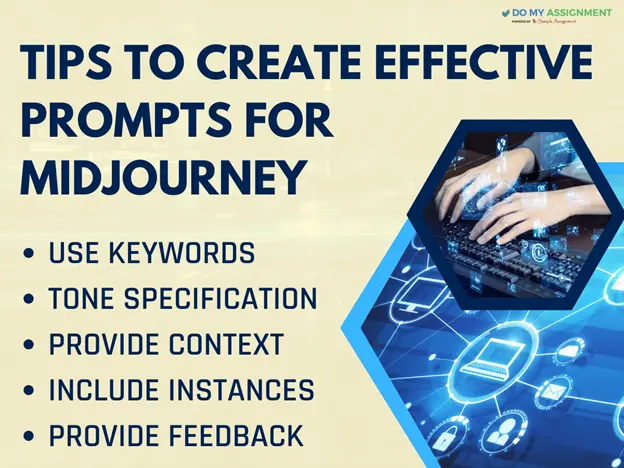
Here are some of the tips that can help you write better prompts for Midjourney AI. Let’s go through each one by one:
1. Make Use of Keywords
Include particular terms associated with the subject or idea you have in mind. Content that supports your goals is produced by the AI with the aid of keywords.
2. Give Context
Give background information to the AI regarding the subject matter or the intended use of the content. In doing so, the AI is able to produce content that is more appropriate for the intended context and more accurate.
3. Indicate the Tone
Use the prompt to express any specific tone you have in mind for the material. Telling the AI what tone it wants to write in, whether it be professional, conversational, or educational, makes the writing process go more smoothly for it.
4. Provide Examples
You should include any specific examples or reference materials in the prompt if you want the AI to use them as a source of inspiration. The AI can better comprehend the style and organization of the material you want it to have by looking at examples.
5. Provide Feedback
Give constructive criticism if you're not happy with the first output in order to steer the AI in the proper direction. With time, the AI will be able to enhance its performance by assimilating your feedback.
Always keep in mind that the quality of the Midjourney prompt has a major impact on the generated content's relevancy and correctness. You may maximize Midjourney's usefulness and achieve the desired outcomes by following these suggestions and giving precise instructions.
Functioning Mechanism of Midjourney AI
Midjourney is dependent on diffusion models and big language models, two relatively recent developments in machine learning technology. If you've used chatbots with generative AI like ChatGPT, you may already be familiar with the former. The meaning of the words you write into your prompts is first deciphered by Midjourney using a vast language model. You can think of this as a numerical version of your prompt, and it is then transformed into something called a vector. This vector also aids in the guidance of diffusion, another intricate process.
The quick surge of AI picture generators can be explained by the fact that diffusion has just gained popularity in the last ten years. A computer is used to gradually introduce random noise to its training dataset of images in a diffusion model. It eventually picks up on how to reverse the noise in order to restore the original image. The theory behind this is that a model of this kind may be trained to produce wholly original visuals.
What is Midjourney V5?
With the help of Midjourney v5, you may effectively transform your thoughts into visuals. Released in March 2023, it is the most recent iteration of the AI text-to-image generator. It is superior to the earlier versions thanks to its numerous new features and enhancements.
How to Use Midjourney V5?
The following procedures must be followed in order to join the Midjourney Discord server:
Step 1: Register for a Discord Account
You must first have a paid Midjourney subscription plan and a Discord account. By going to the Discord website and following the instructions in your email to validate it, you can establish a Discord account. Go to the Midjourney’s website to sign up for a plan.
Step 2: Installing the Discord App
After that, you must use the web version of Discord in your browser or launch the Discord app on your device. The Discord app is available for download through the Microsoft Store, and you can also use the web version by going to the Discord website.
Step 3: Log onto Discord and Join Midjourney
Next, you must locate the invite link to the Midjourney Discord server. By visiting the Midjourney website and selecting the Join Discord option located in the upper right corner of the page, you can obtain the invite link.
Alternative Method
Use the invite link at https://discord.gg/midjourney.
- You now have to click on the invitation link or copy it to your browser's clipboard. This will cause a page to load asking you to join the Midjourney v5 Discord channel.
- Alternatively, you can utilize the + icon located on the Discord app's left sidebar and choose Join a Server. After that, click Join after pasting the invitation URL into the text field.
Then, you must agree to the Midjourney v5 Discord server's rules and terms of service.
Step 4: Sign up for Midjourney
- You must now sign up for a Midjourney subscription and connect it to your Discord account.
- In order to accomplish this, enter /Subscribe to any beginner’s channel and adhere to the directions that the Midjourney bot will send you in a direct message.
- Select the "Manage Account" button.
- Get an appropriate plan.
Step 5: Choosing Version V5 Midjourney
You now need to select the most recent V5 version of Midjourney. All you have to do is write /settings and press Enter in any novice chat window. Choose the most recent version, then have pleasure in it.
Step 6: Create an Image
- To create an image, just type a prompt in the chat window and hit Enter.
- Type a prompt to build the image, and it will be generated shortly.
Key Strategies to Enhance Your Experience with AI Midjourney
Here are some best practices to bear in mind so that you may get the most out of Midjourney:
Define Your Goals Clearly
Make sure you know exactly what you want to accomplish with your artwork before you begin a project. This will ensure that the finished product satisfies your objectives and help direct your design decisions.
Try Out a Variety of Looks
Midjourney has a large selection of style options. In order to determine which option is best for your brand, don't be scared to experiment and try out several combinations.
Keep it Straightforward and Focused
Despite the wide range of customization choices that Midjourney provides, it's crucial to maintain the clarity, simplicity, and focus of your designs. Do not overcrowd your artwork with extraneous details or information.
Keep Your Brand Consistent
Make sure that any artwork you create for your company or brand complements your current visual identity and branding guidelines. Establishing consistency is essential for fostering trust and brand recognition.
Get Feedback and Make Adjustments
Don't be afraid to ask friends, clients, or coworkers for their opinions. Their opinions might offer insightful commentary and assist you in improving your designs. Accept criticism and keep refining your work since iteration is a crucial step in the creative process.
These recommended practices can help you explore your creativity and produce visually striking artwork that draws viewers in. You may also use Midjourney AI to explore all of the amazing possibilities it offers.
In a nutshell, Midjourney is a cutting-edge platform driven by AI that simplifies and opens up the process of creating art. AI can help you realize your creative visions, regardless of your level of experience as a designer.
How to Get the Most of Midjourney?
Here are some of the methods that can enhance your experience with the Midjourney AI. Proceed further and learn more.
1. Exploring More Complex Settings and Configurations
To get the most out of this AI-powered application, Midjourney, you must investigate all of the complex settings and options available. You can get the greatest outcomes and improve your experience with these features. The following are some crucial areas to concentrate on:
1. Customizing AI Inputs
You can provide particular commands or recommendations to influence the AI's output during Midjourney. By experimenting with different prompts and directions, you can adjust the generated material to match your intended tone, style, or goal.
2. Managing Content-Length
You may control the output by using the "Temperature" parameter if you require content to have a certain length. Higher values produce more expansive and creative outputs, while lower values produce more concise and concentrated content.
3. Using Context and Keywords
Relevant keywords and context can be a highly effective way to create content that centres around particular themes or topics. Due to Midjourney's capacity to comprehend and integrate various components, the output is more pertinent and focused.
2. Leveraging Midjourney's Potential for Artistic Endeavours
In addition to its useful uses, Midjourney AI is a very useful tool for artistic endeavours. The following advice will help you make the most of Midjourney's creative potential while using it for creative projects:
1. Idea Generation
Midjourney can help you come up with new ideas and viewpoints if you're having trouble getting inspired or are in a creative slump. Just pose a query or prompt about your project and let Midjourney's cutting-edge algorithms let their imaginations run wild.
2. Character Development
Midjourney can be a great tool for authors and storytellers to create likable characters. You can get creative backstories or descriptions that vividly describe your characters by entering attributes, histories, or situations.
3. Plot Development
Midjourney might offer original viewpoints and surprising turns when narrative concepts or storylines are being brainstormed. Try out various prompts to discover intriguing and unique story paths.
4. Creative Collaboration
By providing fresh concepts or producing material that captures readers' interest, Midjourney can help creatives collaborate with each other. You can encourage a group creative process by showing your Midjourney-generated results to associates or partners.
Do not forget that AI Midjourney is an effective tool that is best used in conjunction with human ingenuity and judgment. It can produce some very good content, but you should always check and edit the final product to fit your own needs and preferences.
Is Midjourney better than DALL- E?
When it comes to AI art generators, Midjourney is undoubtedly the most powerful, but how does it stack up against other rising talents like DALL-E 3? Let’s find out!
OpenAI's AI art generator, DALL-E 3, is the most recent version and is compatible with ChatGPT. Using DALL-E 3, you can use the brainstorming prompts generated by ChatGPT directly from the chat window to make graphics.
In what way, then, do they differ?
1. Price
Users of ChatGPT Plus and ChatGPT Enterprise can access DALL-E 3. The monthly subscription fee is $20. The base package for Midjourney is $10.
2. Image quality
Midjourney's photos occasionally have more visual depth, but DALL-E 3 generations typically respond to the prompt much more accurately. Midjourney has an additional advantage thanks to the Vary (Region) feature.
3. Usability
Since DALL-E 3 is directly incorporated into ChatGPT, it is far simpler to use than Midjourney. Because you can only utilize the bot through Midjourney's Discord server or your own private Discord server, Midjourney requires more steps.
4. Public Figures and Celebrities
Midjourney can produce visuals based on prompts that have the names of these individuals. DALL-E 3 prohibits the fabrication of photographs featuring prominent personalities and has stringent guidelines.
Conclusion
To sum up, it can be concluded that with its robust features and simple UI, Midjourney has completely transformed the field of generative AI. Because of its accessibility, people with a variety of backgrounds can readily study and experiment with artwork created by Midjourney AI. Even non-technical people can now produce beautiful and distinctive pieces thanks to Midjourney's tremendous reduction of past technical restrictions.
For those who want to learn more about the realm of artificial intelligence art, Midjourney is a useful tool. The method to use it is quite simple and there are some ways in which its usage can be highly optimized. And the credit goes to its user-friendly interface and intuitive capabilities.



Nick Johnson
Nick is a multi-faceted individual with diverse interests. I love teaching young students through coaching or writing who always gathered praise for a sharp calculative mind. I own a positive outlook towards life and also give motivational speeches for young kids and college students.
Get Free Quote In 2 Minutes*

Related Blog


Still Confused? Take a look at the reviews of DoMyAssignment
6984+ Positive Reviews with a rating of 4.9/5

21-04-2023
Biotechnology
Incredible service! My assignment was perfect and delivered on time. Highly recommend Do My Assignment!Connor, Order Code: SA**398

18-04-2023
Management
Excellent support and high-quality work! Saved me so much time and stress. Thank you!Peter, Order Code: SA**358
12-04-2023
Nursing
Fantastic experience! Quick delivery and top-notch quality. Will definitely use Do My Assignment again!James, Order Code: SA**698
05-04-2023
Accounting
Reliable and professional! The assignment met all my requirements. Great service!Jordie, Order Code: SA**613
21-04-2023
Mathematics
Outstanding work! The team was very responsive and the assignment was flawless. Highly recommended!Harper, Order Code: SA**112
28-03-2023
Management
Do My Assignment exceeded my expectations! Detailed, well-structured, and prompt delivery.Tom, Order Code: SA**558
21-03-2023
Engineering
Highly satisfied! My assignment was well-researched and excellently written. Great job!Chris, Order Code: SA**287
15-03-2023
Physics
Amazing service! The quality exceeded my expectations. Delivered before the deadline!Sheryl, Order Code: SA**412
10-03-2023
Programming
Superb assistance! Professional, punctual, and perfect. Do My Assignment is the best!Ben, Order Code: SA**271
18-04-2023
Statistics
Exceptional work! The assignment was detailed and well-organized. Truly impressed!Sydney, Order Code: SA**388
09-03-2023
Company Law
Top-quality service! My assignment was accurate and well-written. Will use again!Tory, Order Code: SA**943
04-03-2023
Xero
Professional and efficient! Delivered high-quality work right on time. Very pleased!Henry, Order Code: SA**732
23-02-2023
Economics
Fantastic support and excellent writing! Made my academic life so much easier!Cameron, Order Code: SA**906
19-02-2023
Dissertation
Great experience! Thorough research and perfect formatting. Highly recommend!Phil, Order Code: SA**322
15-02-2023
Chemical Engineering
Excellent quality and timely delivery! Very happy with the service provided.Jon, Order Code: SA**625
11-02-2023
SPSS
Perfectly done assignment! Clear, concise, and delivered on schedule. Thank you!Mitchell, Order Code: SA**590
08-02-2023
Company Law
Super fast and reliable! The assignment was spot on. Definitely worth it!Monica, Order Code: SA**821
05-02-2023
IT
Amazing job! The content was insightful and precisely what I needed. Bravo!Jaspreet, Order Code: SA**432
01-02-2023
Management
High-quality work and timely submission! Very professional service. Will order again!Ankita, Order Code: SA**834
24-01-2023
Taxation
Exceptional writing and great customer service! Truly a life saver for students!Alex, Order Code: SA**228